The publisher's server did not answer. This is usually temporary, or your network blocks it.






Report DunkIt
What is wrong with this game?
Are you the copyright owner? Send a takedown notice and we respond within 24 hours.
How to Play DunkIt
- 1. Select a modeChoose between 35 physics-based dunk levels or quick matches against the AI.
- 2. Master the movementsUse the keyboard to grab the ball, rotate, tuck, jump, and shoot your way through each stage.
- 3. Complete the dunksTime your grabs and slams perfectly to clear obstacles, trampolines, and moving balls.
To play DunkIt in your browser, you will need to use your keyboard for all actions. For the dunk levels, press J to grab the ball or dunk, use A and D to rotate, press S to tuck, and press R to restart if you fail. For quick matches, use WASD or the arrow keys to move around the court, hold Shift to sprint, and press Space or W to jump. To shoot, hold and release J at the top of your jump. Press K to steal the ball from opponents on the court.
The publisher listing does not state that this game is mobile ready. Because the controls rely heavily on various keyboard keys like letters, arrow keys, Shift, and Space, you will likely need a desktop or laptop computer with a keyboard to play this browser title properly. The listing does not mention mouse or touch screen support for these actions.
About DunkIt
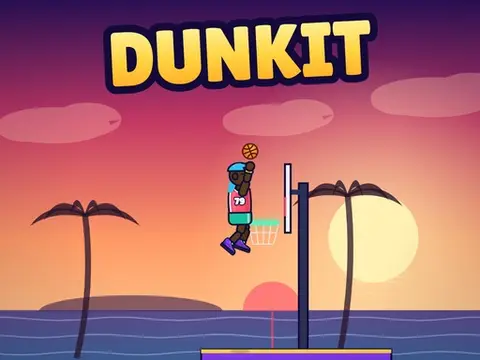
DunkIt is an arcade basketball game hosted on the GameMonetize platform. Players can jump, flip, and slam through a variety of setups featuring trampolines, moving balls, and difficult obstacles. The game focuses heavily on physics-based mechanics where timing your grab and slam perfectly is the key to beating each individual stage. Alongside the standalone trick dunks, the title offers quick match options against computer opponents for those who want a more traditional basketball experience.
The gameplay includes a total of 35 physics-based dunk levels where you can pull off crazy trick dunks such as the Tomahawk, Superman, or Backwards Dunk. If you want more variety after finishing those stages, you can jump into quick matches against the AI. These matches include full-court 1v1 games played in 2D, or half-court 3D games that range from 1v1 matchups all the way up to 3v3 team configurations, providing different ways to enjoy the basketball action.
This browser game suits players who enjoy sports arcade challenges and timing-based obstacles without needing to download large files. The publisher listing does not state how long it takes to finish all 35 levels, nor does it mention extra unlockables, audio settings, or specific difficulty sliders beyond the described modes. You can jump straight into the action through your web browser and test your timing against the physics engine and computer opponents.
DunkIt is listed on GameMonetize under Arcade and Sports, with the tags 2D, 3D, Basketball. The publisher does not mark it as mobile ready, so a computer with a keyboard or mouse is the safest way to play it. DunkIt is free to play, needs no account and does not ask you to download anything.
Tips and Tricks
Watch the obstacles
Pay close attention to moving balls and trampolines before you make your move. Since the levels rely on physics, timing your approach to these hazards makes a big difference in whether you complete the trick or miss the basket entirely.
Practice the rotation keys
Getting used to the A and D keys for rotation helps you pull off complex maneuvers like the Tomahawk, Superman, or Backwards Dunk. Take your time learning how your character spins in mid-air during the trick levels.
Time your jump and release
When playing the quick matches against the AI, holding and releasing the J key at the absolute peak of your jump is crucial for accurate shooting. Rushing your release can cause you to miss scoring opportunities during 1v1 and 3v3 games.
Use sprint wisely
When navigating the full-court 2D matches or half-court 3D games, holding the Shift key lets you sprint across the floor. Use this movement option to keep up with opposing players and position yourself properly to steal the ball with the K key.
DunkIt FAQ
Is DunkIt free to play?
Yes, you can play this game directly in your web browser for free without needing to purchase anything from the publisher page.
What are the controls for DunkIt?
The game uses the keyboard. For dunks, use J, A, D, S, and R. For matches, use WASD or arrows, Shift, Space or W, J, and K.
Can I play DunkIt on my mobile phone?
The publisher listing does not mark the game as mobile ready, and the instructions rely entirely on desktop keyboard keys.
What is the main goal of the game?
The goal is to time your grabs and slams perfectly to clear 35 physics-based dunk levels and win quick matches against AI opponents.
Do I need to download DunkIt to play?
No download is required. The title runs directly as a free browser game through the GameMonetize platform using your standard internet browser.
Similar Games
If you enjoy DunkIt, there are more games to try right now. Basketball Stars (give the ball the perfect direction, score point after point and beat your own high score); Penalty Shooters (play football with cartoon stars: score goals, make passes and defend your side); Bottle Flip 3D (flip a plastic bottle through different rooms: tap at the right moment to jump and land); Mini Boxing 2 (step into pixel arenas, face eleven unique rivals, and time your star punches to claim victory).