The publisher's server did not answer. This is usually temporary, or your network blocks it.




Report Add Me Up!
What is wrong with this game?
Are you the copyright owner? Send a takedown notice and we respond within 24 hours.
How to Play Add Me Up!
- 1. Move the BlobsUse your keyboard to slide all jelly blobs on the screen one tile in your chosen direction.
- 2. Combine NumbersBump blobs into each other to add their values together until they reach the required burrow number.
- 3. Complete the GoalSuccessfully fill every burrow on the map with a blob that matches its specific number to finish the level.
To play Add Me Up!, use the arrow keys or the WASD keys on your keyboard to shift every jelly blob on the board one tile at a time. If you need to reset your current progress, press the R key. To toggle the sound, use the M key. You can return to the previous menu by pressing Q or the Escape key. To navigate menus, use the Enter or Space keys to select play, and use L to access your custom levels.
This game is marked as mobile ready, meaning it is designed to function on touch-based devices. You should find that the interface adapts to your screen, allowing you to manipulate the blobs and navigate the level editor without needing a physical keyboard.
About Add Me Up!
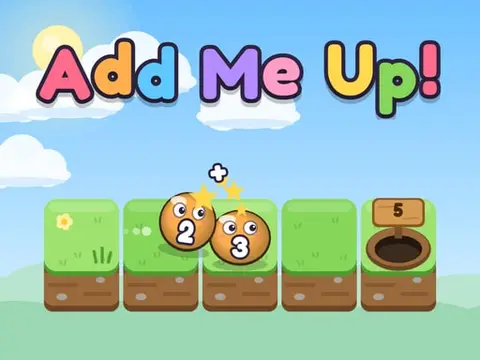
Add Me Up! is a logic-based puzzle game where the objective is to fill specific burrows with blobs that carry the correct numerical value. Every time you move, all the blobs on the board shift simultaneously. When you push a blob into an obstacle or another blob that cannot move, they combine their values. For instance, a blob labeled two and a blob labeled three will merge into a single five. You must carefully plan your movements to ensure every burrow is filled with the exact number required to clear the stage.
The game includes 100 distinct levels that increase in difficulty as you progress. You start in small, simple meadows and eventually move on to larger, more complex island maps. Beyond the pre-made content, there is a built-in level editor. This tool allows you to paint your own puzzles by selecting from grass, erase, blob, or burrow tiles. You can adjust the settings for these tiles using the plus and minus keys. Your progress and any levels you create are saved automatically, allowing you to return to them later.
This game is suitable for anyone who enjoys math-based logic challenges. Since there is no timer and no limit on how many moves you can make, you can take your time to solve each puzzle at your own pace. The listing does not specify if there is a hint system or a tutorial mode beyond the basic instructions provided. You can expect a straightforward experience centered entirely on the mechanics of sliding and merging blobs to reach the target numbers across all available levels.
Add Me Up! is listed on GameMonetize under Hypercasual and Puzzle, with the tags Brain, Logic, Math. The publisher marks it as mobile ready, so it can also be played in a phone or tablet browser. Add Me Up! is free to play, needs no account and does not ask you to download anything.
Tips and Tricks
Plan Your Movements
Because every blob moves at the same time when you press a key, you must consider the position of every single piece on the board before you make a move. Think about how the boundaries of the map will affect the blobs and where they will end up after you slide them.
Use the Walls
The walls of the map are your primary tool for merging blobs. Since blobs only combine when they bump into something that cannot move, you should use the edges of the map to stop specific blobs while you maneuver others into them. This is essential for reaching the correct sums.
Focus on the Burrows
Always look at the target numbers required for the burrows before you start moving your blobs. It is often helpful to work backward from the final goal to see which blobs need to be combined first. Prioritize getting the right numbers into the burrows while keeping the remaining blobs clear.
Experiment in the Editor
If you find yourself stuck on a difficult level, try using the level editor to recreate a similar layout. By building your own puzzles, you can gain a better understanding of how the movement mechanics and the addition logic work in practice, which might help you solve the main levels.
Add Me Up! FAQ
Is this game free to play?
Yes, Add Me Up! is a free browser game.
What are the controls for the game?
You use the arrow keys or WASD to move the blobs. The R key restarts the level, M toggles sound, and Q or Esc takes you back. Use Enter or Space for menu selections.
Can I play this on my phone?
Yes, the game is marked as mobile ready. This means it is optimized to run on mobile devices, allowing you to play the puzzles on your phone or tablet using touch controls instead of a keyboard.
What is the main goal?
The objective is to move jelly blobs across the board so that they combine their values and fill every burrow with the exact number required to clear the level and move forward.
Do I need to download anything?
No, there is no download required. As a browser-based game, it runs directly in your internet browser window, provided you have a compatible device and an active connection to the website hosting the game.
Similar Games
If you enjoy Add Me Up!, there are more games to try right now. Block Blast (fill the empty tiles with different blocks and see if you can complete all 50 levels); 2048 (merge the numbers to make a bigger number. The classic puzzle, free in your browser); Helix Jump (guide a bouncing ball down a helix tower. Easy to learn, hard to put down); Stack Ball (bring the ball down without falling on the black tiles, in another addictive helix game).